Table of Contents
Overview
This page has operating instructions for the Apple II+ core.
Links
- Winfried's blog about the apple2 core for the MIST
- Core binaries
- Source code repository
- Homepage of the Apple2FPGA project
Installation
Copy the *.rbf file at the root of the SD card.
You can rename the file to core.rbf if you want the MiST to load it automatically at startup.
Disk images can be copied anywhere on the SD card and are selected via the OSD menu. They must be in NIB format to work (instead of e.g. DSK). If you have many files you might want to store them into alphabetized sub-folders to access them more quickly.
Controls
MiST front panel buttons:
- (left) Reset MiST to default core
- (middle) Open OSD menu
- (right) Reset with current disk
OSD Menu
The core will start with a blank screen. Press F12 to enter the OSD menu:
- Load
*.NIB: Insert .NIB disk image in drive 1 - Load
*.NIB (second line): insert disk in drive 2 - Monitor Type (Color/Monochrome): Select Monochrome for Green or Amber screen
- Monitor Mode: Toggles between Color/Raw B&W mode (Color monitor) or Green/Amber (Monochrome monitor)
- Enable Scanlines: turn it on to display scanlines like a CRT
- Joysticks: normal/swapped
Monitor Options
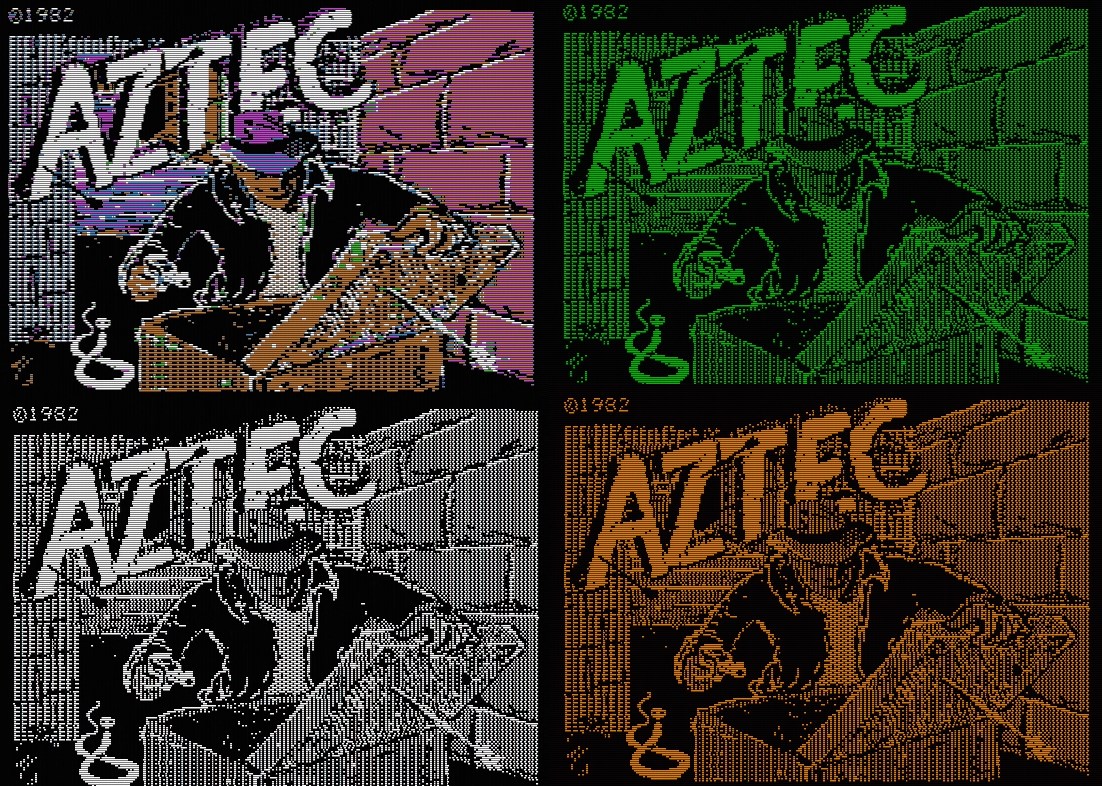
Here is a comparison of the four video choices. Color monitor shows either Apple II colors (simulating NTSC composite, top left) or a raw B&W display (bottom left). On the right are the two monochrome modes (green on top, amber on bottom).
This image uses scanlines, the result is a little brighter if scanlines are switched off.
Notes
- Video mode is 720x481p at 60hz.
Gameplay videos
Home
MiST User Guides
- What is it?
- FAQ
- Board overview
- Installing firmware
- Joystick mapping
- Peripherals
- Projects it is based on
- Rom Management
- Setting up a mist.ini file
- Using a custom font
- Tested Displays/Upscalers
- Troubleshooting
- Videos
- User Videos
User Guides of MiST cores
- Getting Started
- Current core status
- Joy/Keyboard/On-board Shortcuts
- MIDI support
- SD card setup
- Startup menu
Cores
- Acorn Archimedes
- Amstrad CPC
- Amstrad CPC - alternative
- Apogee BK-01/Radio86RK
- Apple I
- Apple II+
- Apple //e
- Apple Macintosh
- Atari 800
- Atari ST
- Atari ST/STe (mistery)
- BBC Micro
- BK0011M
- Commodore 16/Plus4
- Commodore 64
- Commodore Amiga (AGA)
- Commodore PET
- Commodore VIC-20
- Elan Enterprise
- Exidy Sorcerer
- HT1080Z (TRS80 I clone)
- LM80C
- Luxor ABC 80
- Mattel Aquarius
- Miles Gordon SAM Coupe
- MSX
- Ondra SPO 186
- Oric
- PC (Next186)
- PC (XT)
- Primo
- Sinclair QL
- Sinclair ZX80/ZX81
- Sinclair ZX Spectrum
- Sinclair ZX Spectrum 48K - alternative
- Sinclair ZX Spectrum Next
- Specialist/MX
- Tandy TRS-80 Model I
- Tandy TRS-80 Color Computer
- Texas Instruments TI-99/4A
- TSConf
- Vector-06C
- Videoton TVC
- Vtech Video Technology Laser 350/500/700
Console cores
- Atari 2600
- Atari 5200
- Atari 7800
- Bally Astrocade
- Coleco ColecoVision
- GCE Vectrex
- Intellivision
- Nec PC Engine/TurboGrafx-16
- Nintendo Gameboy
- Nintendo NES
- Nintendo SNES
- Philips Videopac/Odyssey²
- Philips Videopac/Odyssey² - alternative
- Sega Genesis/Megadrive
- Sega Master System
- SNK Neo Geo MVS/AES
Arcade cores
Hardware add-ons
For Core Developers
- Developing for MiST
- FPGA projects list
- How to compile cores
- MIST developer tutorials
- Porting cores
- SDRAM details
- ARC files
- MRA files
Hardware Development
MiST FPGA - One Chip to Rule Them All